

Alright, Dear Future Me,
Let’s start this one with the game updates first…
I did A THING!!!
It’s not perfect yet, but you get the idea.
The goal of this month was a working prototype of some of the core features. Mainly player controls that FEEL good, and are fun to use. To that effect, I think I’ve succeeded, and I’m going to break down some of the features that I think make it work. Many of these are common platformer mechanics working behind the scenes of other games you may know.
The Name of the Game is Forgiveness
Aside from personal preference, what I find makes player movement “Good” (opinion) is that the player moves based on expectation and not exact input. E.g. if I hit jump a millisecond before I land, my brain still expects a jump and when it doesn’t happen I feel cheated. This of course is within limits, as if I know I hit the button at the wrong time and still succeed it feels less like a fun challenge and more like a swaddle. So applying a little forgiveness to player motion but still keeping the inputs consistent as one would expect is the challenge I’m trying to tackle in these controls.
The trick is: help the player when their intention is clear, without making it feel like the game is playing itself.
Here are a few examples included in this prototype, some of which are common industry standards I’m just putting a little spin on:
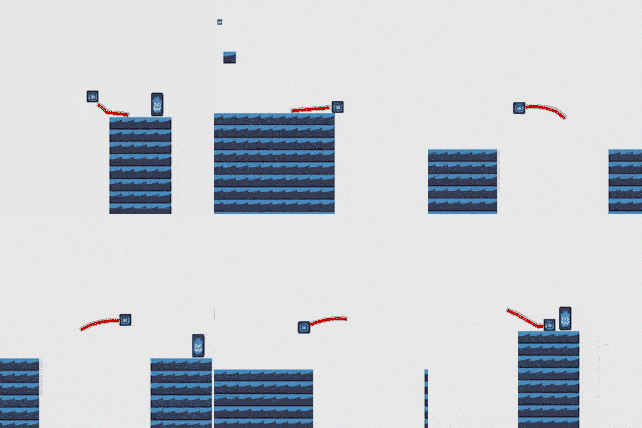
Coyote Time
This one you’ve probably heard of, but the gist is giving the player a split second after walking off a ledge to make a jump.
—
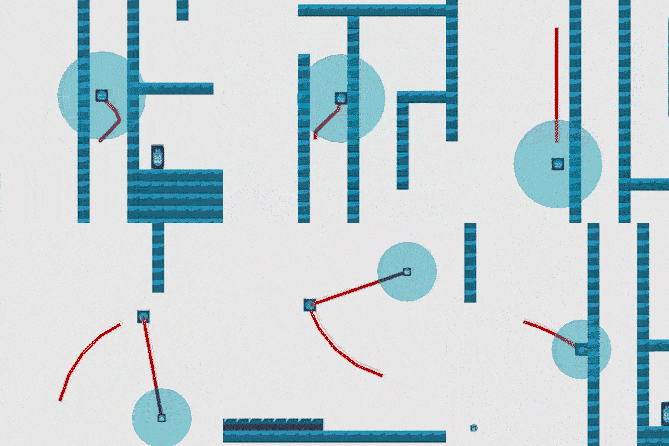
Aim Assist
In the case of this game, aim assist is in the form of a collision circle that expands as it gets further away from you. Given the hook shot is intended to be a flick on the right stick, this can be difficult to aim perfectly in the moment. Especially when you’re moving, the screen is moving, maybe even the target is moving. I want to provide the player a little extra to make the shot, like the computer knows what they’re trying to do.
—
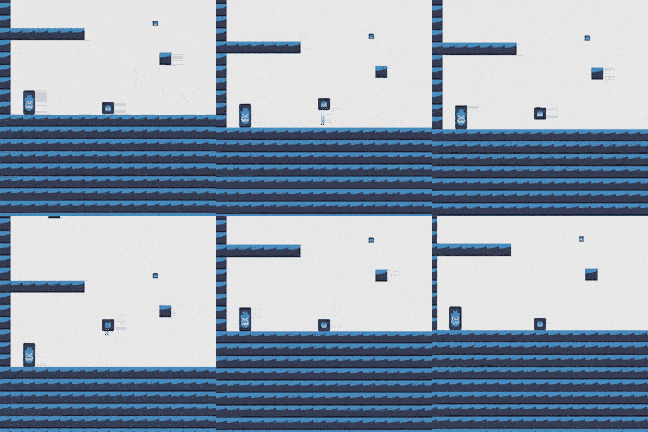
Variable Jump & Air Movement
Being able to adjust your position in the air is critical to feeling in control. Of course not realistic, but in a game genre that’s defined by jumping… You jump and immediately know before you even land that you messed it up and there is nothing you can do about it… repeatedly. That’s a recipe for frustration and anger. To that effect, we allow the player to cut a jump short or move a little to the left or right as needed.
—
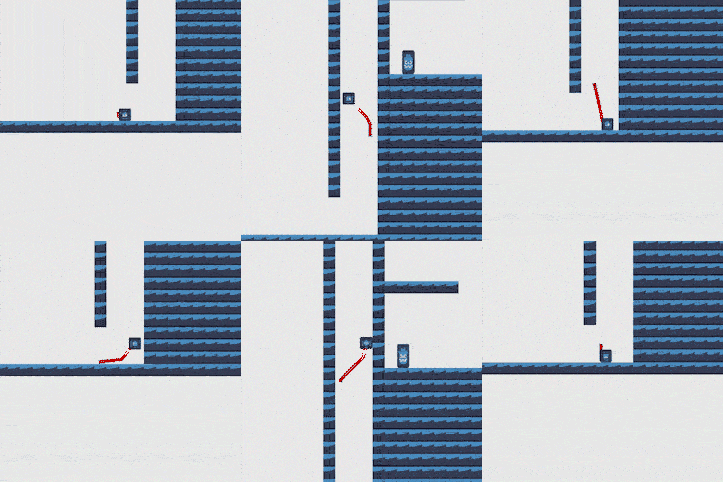
Wall Jump Easing
To make walls and wall jumping a little easier there are a couple things I’ve added here. One being you don’t need to hold a direction to jump off the wall. Just the jump button will work. This allows you to effectively move up a shaft without having to time it necessarily. Though pointing away from the wall won’t hinder you either.
At the same time, holding in the direction of the wall will lessen the jump strength outward and allow you to climb to a degree. Just enough that if you hold run you can make ground, but not an efficient method.
The last addition is a very short window for holding to the walls. In some games if you want to “peel” off the wall (not jump) there is a delay added so you have time to pick a direction and hit jump, a forgiving feature itself. Personally, I find this more frustrating as it feels like an input delay versus everything else. So in this game, since you don’t need to pick the direction of the jump when jumping off the walls, there is a delay so you don’t come off by accident, but it’s very, very short.
—
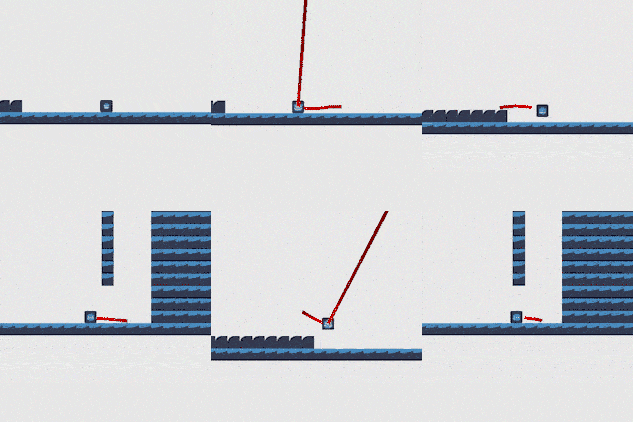
Swing Start Impulse
This one’s a little more unique. With the hook shot, when starting your swing, you can very easily forget to jump before hand. This completely cancels any momentum you may have from your run. So we assume the player would like to swing by providing a little upwards impulse. Just enough to get them off the ground and keep their momentum going.
—
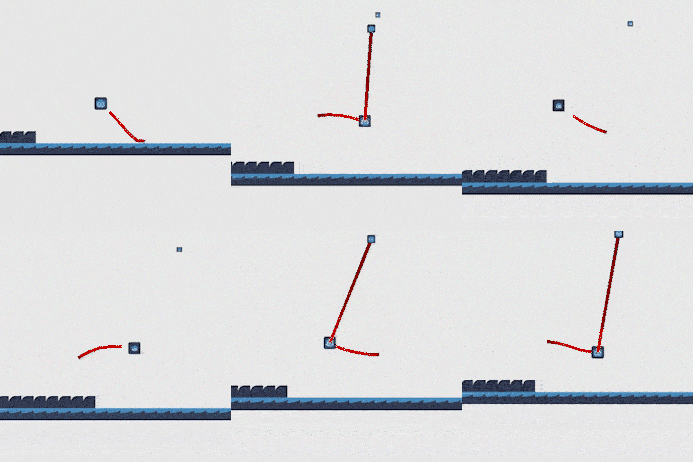
Swing Off Impulse
Just like the Swing On Impulse, it’s assumed the player wants to keep their momentum when coming off the swing. However, even when they may literally retain the exact momentum from the swing when jumping off, it FEELS like the motion is lacking. To keep the exciting fast-paced feel, I’ve added a small impulse to increase the player’s speed off the swing. As a bonus, you get additional speed off of successive swings as well.
—
Bonus
Unrelated to the forgiving features, and making the player motion feel fun. I’d also like to show off this sweet “wrap mechanic”. It may not look like a lot, but I’m super excited about it.
If you’d like to try these features out, I’ve set up a playable sample online with the following controls below. This version does not have a goal, just a playground, and starts you at the highest point for exploring without a challenge. In the final game, the intent is to have the right trigger be the Run button, but the web version has trouble with the triggers.
Online Playable Prototype (Best played with a controller)
Left Stick: Move (Down to Crouch)
Right Stick: Fire Hook Shot
A (Button Button): Jump
Y (Top Button): Reset to Start
Left Bumper: Run
Right Bumper: Dash
—
Apologies to keyboard players. There are some controls setup for it, but not the hook shot, which is important for getting around.
Next Steps
With a basic prototype out of the way, the next major goal is a vertical slice. That however is a much bigger project than the previous goals, and I won’t be able to accomplish the whole thing in a single month. This next month, I aim to have most of a playable level completed.
This narrows down the parts to work on to:
- 1 level design
- 1 tile-set for the level
- The ability to collect sad baby cows
- A short cut-scene
- A cine-kill (A special cut scene that plays if you kill an enemy it a specific way)
- An end state
- and minor stat tracking.
—
This is quite a lot for me given a day job, but a good set to start with for the month. If you didn’t notice the featured animation at the top, I’ve already started the in-game look of Steve and some simple animations to get us started.
Now for the Personal Journey Stuff
So if you recall from the last post, I’m doing this project in part as a New Year’s Resolution, but also as a means of improving myself as a creative person. I talked about my struggles to do creative things even when I know it’s what I want to do. As a quick reminder the goals for the project are first and foremost at least a playable demo on Steam but also include rules, such as:
- It doesn’t need to be perfect
- I have to do it because I enjoy the process
- I must do more to have my work reviewed/critiqued, not just be in my cave
- I must incorporate creative learning in my daily life
- and I must actively take steps to improve my mental health
—
As far as these goals/rules go, I think I’m doing alright so far. I have started seeing a therapist with current efforts being put towards accepting uncertainty. I’m still listening to podcasts about game design and picking up (listening) to a good book here and there, but I think I can go further and try to join in a local game design community perhaps. I’m posting to a small group of friends for reviews and critiques, but having a wider community of creatives couldn’t hurt as well.
Most importantly, it’s not perfect, but I absolutely am enjoying the process.

Reminder to track progress on the game’s page and I’ll see you next month!